
Table of Contents
What is a staging environment?
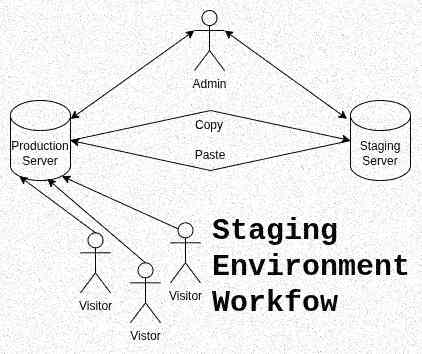
A staging environment is a copy of your website/project that runs on a server inaccessible to the public.
It is the counterpart to the production environment which is the version of you website accessible to the public.
The pros of using a staging environment
Testing safely without risking damaging the user experience
A staging environment is useful to test the implementation of new designs or functionalities in a place where mistakes are without consequence.
It can also be use to test the security of your project or do stress tests.
Work in better conditions
The production server may not have enough capacity to work on directly.
A staging environment also doesn’t have to be an exact copy of the production server.
For example, to test more easily without any performance slowdown, we can create a staging server with 10 test users instead of the 1000 of the production server.
The drawback: A staging environment workflow is slower than working directly on the production environment
Still, a staging environment comes with its costs.
If it will not much impact you financially -you can create a staging server on you computer and a decent server costs $8 per month- it will be another story in time.
You still have to put the staging server in place.
Making constant back-and-forth movements between the two environments to ensure consistency
If you work directly on the production server, you’ll go a lot faster.
The potential drawbacks or working directly on a production server
For example, imagine you want to change the design of your website: do you want your visitors to see all the tests you gone through in real time?1
Another more dramatic example, do you want your website being totally inaccessible because of a mistake in PHP code?
This kind of problem is costly. If the interruption is too long and google crawlers see it, your SEO will be penalized. And of course, you may miss some customers.
When a staging environment is not necessary
On a website with low affluence
If the website has no affluence and customers, as for when it’s starting, working directly with a production server is not an issue.
All you have to ensure is not making the website unavailable to not interfere with your SEO buildup.
The techniques to work on the production environment with minimal risk
Using private pages
You can do your tests on a private page on your production server.
And once you have the results you’re satisfied with, you can replace the old parts with the new ones by copy/paste them.
It is very easy to create a private page on WordPress or other CMS. Just be careful to do it well to avoid google indexing it or visitors going through it accidentally.
Proceed at low traffic hours
If you are obligated to work in everyone’s eyes, you can mitigate risks and disruptions by working at low traffic periods.
Indicate that your site is temporarily unavailable
I personally don’t like this option as it may penalize SEO for a website and still an harassment for your users if it is an app.
But if you know your website or service is going to be inaccessible, you better warn people before and indicate when it will come back.
Making backups
Either you’re using a staging environment or working live site, making backups are a good habit to adopt.
You cannot be 100% sure that you haven’t missed anything and that no problem will appear on the long run.
So it is better to have a fallback option.
You can do backups periodically and before making significant changes.
Conclusion
To make it simple, if you can work directly on your project on the production server without harm, do it. Your work will be faster and easier.
A staging environment is particularly indicated for complex and sensitive projects. It is a slower workflow but the safest way to do testing or implement modifications.
- As written later in this post, you can avoid this by creating a private page. ↩︎
Leave a Reply